TerminalDrome 0.8.5 with great Features
Hej guy, TerminalDrome Version 0.8.5 ist out for downloading via github or
to install via crates.io and rust, cargo install terminaldrome. I am
happy to share this moment with you guys.
Best new thing: after Installation via cargo or compilation and start via
terminaldrome
it will do an initial setup and will ask for your server and credentials, create and salt it with md5 and will nevermore store your credentials in plaintext on your computer.
Subsonic implementation (beta)
Bandcamp now implements the Subsonic API, which will allow you to stream your collection through Subsonic clients that. So if you own a Bandcamp Account, you can get your credentials there and put it in the config.toml and from now on TerminalDrome can with Shift + B switch to your Bandcamp and play all of your bought music.
To get started, go to Fan Settings, scroll down to Subsonic, and generate your credentials.
config.toml addition
[bandcamp]
enabled  = true
url      = "https://bandcamp.com/api/subsonic"
username = "hier_eintragen"
token  = "hier_eintragen"
TerminalDrome
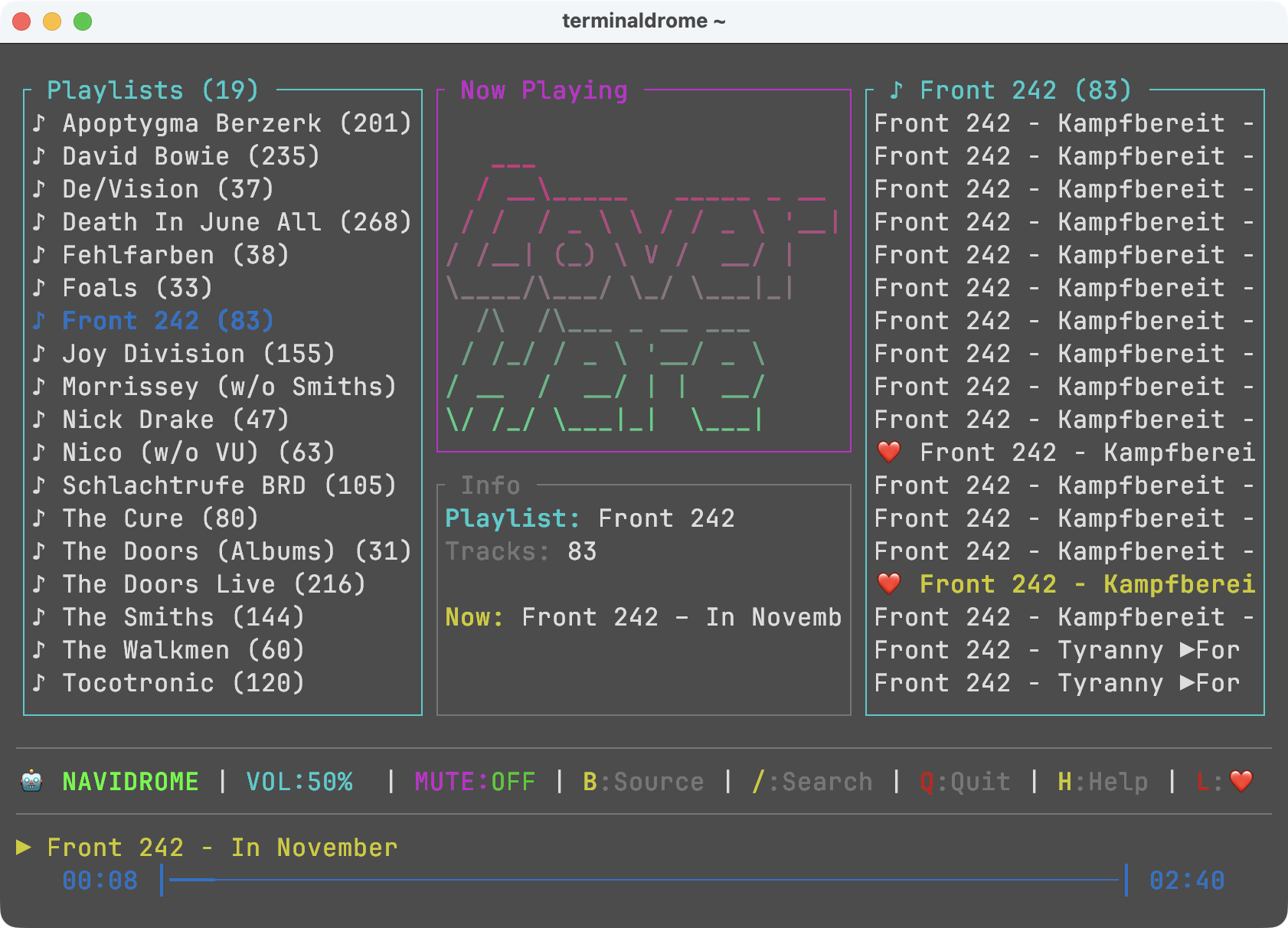
A terminal-based music client for Navidrome (and other Subsonic-compatible servers) and Bandcamp, written in Rust.
    _______                  _             _
   |__   __|                (_)           | |
      | | ___ _ __ _ __ ___  _ _ __   __ _| |
      | |/ _ \ '__| '_ ` _ \| | '_ \ / _` | |
      | |  __/ |  | | | | | | | | | | (_| | |
    __|_|\___|_|  |_| |_| |_|_|_| |_|\__,_|_|
   |  __ \  Jukebox, Likes, Bandcamp & Secure
   | |  | |_ __ ___  _ __ ___   ___
   | |  | | '__/ _ \| '_ ` _ \ / _ \
   | |__| | | | (_) | | | | | |  __/
   |_____/|_|  \___/|_| |_| |_|\___|
                                by Jan Montag
                                version 0.8.5

Features
New in 0.8.5
- 🎸 Bandcamp support — switch between Navidrome/Subsonic and a Bandcamp-compatible server with
Shift+B. - 🔐 Secure first-time setup — if credentials are missing or still placeholders, TerminalDrome asks for them interactively at startup.
- 🧾 CLI arguments —
--config <FILE>,--server <URL>,--user <USERNAME>(plus the usual--helpand--version). - 🔑 Local token derivation — your password (or an optional Navidrome App Token) is hashed together with a random salt and stored only as
token+salt. The plaintext never touches the disk. - ⚙️ Optional Bandcamp config — can be enabled via
[bandcamp]inconfig.toml.
All Features
- 🎵 Browse artists, albums, and songs from your Navidrome server
- 🎸 Optional Bandcamp source (Subsonic-compatible endpoint)
- 📋 Playlist support — view and play your playlists
- 🔀 Shuffle any album or playlist with
Shift+S(Fisher-Yates shuffle, restarts playback from the new order) - 🎉 Jukebox / Party Mode (
Shift+J) — infinite random playback of your full library, auto-refilling in the background - 🖼️ ASCII cover art rendered directly in the terminal
- 🔍 Full-text search across your music library
- ⌨️ Keyboard-driven navigation with quick A–Z jump
- 🔊 Volume control (
+/-) and mute toggle (m) - ⏭️ Next / previous track (
n/p), stop (Space) - ❤️ Like songs (
Shift+L) - 📡 Scrobbling support — marks songs as played in Navidrome
- 🔒 Token-based auth (Subsonic API ≥ 1.13.0 — your password is never sent in plaintext)
- 💾 Persistent state — remembers your last position between sessions
- 🎛️ Source switching —
Shift+Btoggles between Navidrome and Bandcamp
Security & Token Auth
TerminalDrome authenticates against the Subsonic API using token + salt — never with your raw password.
How it works
- On first start (or whenever credentials are missing / still contain placeholder values), TerminalDrome prompts for:
- Server URL
- Username
- Password (or optionally a Navidrome App Token — see below)
- The entered secret is combined with a freshly generated random salt and hashed with MD5:
token = MD5(password + salt) - Only
tokenandsaltare written toconfig.toml. The plaintext password is discarded and never stored. - On Unix systems the config file is saved with
600permissions.
You do not need to visit any website to generate a token. The derivation happens entirely on your machine. All you have to do is enter your normal Navidrome password when prompted.
Optional: Navidrome App Tokens
If you’d rather not type your account password into a terminal at all, you can create a Navidrome App Token and enter that as the “password” when TerminalDrome asks for it. TerminalDrome will then hash the App Token the same way (MD5 + salt) and use the result as the Subsonic token.
To create one:
- Log into your Navidrome web interface.
- Go to Personal Settings → Personal Access Tokens.
- Create a new token for
TerminalDrome. - When TerminalDrome asks for your password, paste the App Token instead.
This is purely optional — a normal account password works just as well, and TerminalDrome never writes it to disk either way.
Requirements
- A running Navidrome instance (or any Subsonic-compatible server)
- Optional: a Subsonic-compatible Bandcamp endpoint
- mpv installed and available in your
$PATH - (Optional) cava for the audio visualizer backend
- Rust toolchain (for building from source)
Install mpv
macOS:
brew install mpv
Linux (Debian/Ubuntu):
sudo apt install mpv
Linux (Arch):
sudo pacman -S mpv
(Optional) Install cava (Visualizer backend)
If you want the visualizer to react to real audio, install cava.
Linux (Arch):
sudo pacman -S cava
Installation
From source
git clone https://github.com/thafaker/terminaldrome
cd terminaldrome
cargo build --release
./target/release/terminaldrome
Install system-wide
cargo install --path .
After that, just run:
terminaldrome
From crates.io
cargo install terminaldrome
Configuration
TerminalDrome looks for a config file in the following locations (in order):
./config.toml(current directory)- OS-specific config directory, e.g.:
- Linux:
~/.config/terminaldrome/config.toml - macOS:
~/Library/Application Support/terminaldrome/config.toml
- Linux:
You can also point TerminalDrome at a specific file with --config <FILE>.
A minimal config.toml looks like this:
[server]
url      = "https://your-navidrome-server.com"
username = "your-username"
# password = "your-password"   # optional; only needed if you want to skip the interactive prompt
# token    = "..."             # derived automatically from password/app token
# salt     = "..."             # derived automatically from password/app token
If the file is missing or credentials are still placeholders, TerminalDrome launches an interactive setup on the next start and writes the resulting token + salt back to disk.
Optional Bandcamp source:
[bandcamp]
enabled  = false
url      = "https://bandcamp.com/api/subsonic"
username = "hier_eintragen"
# token  = "hier_eintragen"
# salt   = "hier_eintragen"
CLI Usage
terminaldrome --help
Available arguments:
| Argument | Description |
|---|---|
--config <FILE> |
Path to configuration file |
--server <URL> |
Subsonic server URL (overrides config) |
--user <USERNAME> |
Username (overrides config) |
--help |
Show help |
--version |
Show version |
Example:
terminaldrome --server https://music.example.com --user jan
Keyboard Shortcuts
Navigation
| Key | Action |
|---|---|
↑ / ↓ |
Move selection up / down |
← / → |
Switch between views (Artists → Albums → Songs) |
Enter |
Confirm selection / start playback |
Tab |
Toggle between Artists and Playlists view |
A–Z |
Quick jump to first entry starting with that letter |
Playback
| Key | Action |
|---|---|
Space |
Stop playback |
n |
Next track |
p |
Previous track |
+ / = |
Volume up |
- |
Volume down |
m |
Toggle mute |
Shift+S |
Shuffle current album / playlist / Jukebox queue and restart |
Shift+L |
❤️ Like current song |
Modes
| Key | Action |
|---|---|
Shift+B |
Toggle music source (Navidrome ↔ Bandcamp) |
Shift+J |
Start Jukebox / Party Mode (random playback of entire library) |
Shift+E |
Toggle fullscreen audio visualizer |
ESC |
Exit Jukebox Mode and return to Artists (also closes the Visualizer) |
Other
| Key | Action |
|---|---|
/ |
Search |
Shift+H |
Show help screen |
Shift+Q |
Quit |
Visual Indicators
| Indicator | Meaning |
|---|---|
🤖 NAVIDROME in status bar |
Active source is Navidrome/Subsonic |
🎸 BANDCAMP in status bar |
Active source is Bandcamp |
🔀 SHUFFLE in status bar |
Shuffle mode is active — song list has been randomised |
🎉 JUKEBOX in status bar |
Jukebox / Party Mode is running |
| Magenta progress bar & song info | Shuffle mode |
| Green progress bar & song info | Jukebox mode |
❤️ next to a song title |
Song is liked/favorited |
How it works
TerminalDrome communicates with your Navidrome server via the Subsonic API. Audio playback is handled by mpv, which is launched as a background process and controlled via a Unix socket. This keeps the TUI responsive while mpv handles all the audio decoding and streaming.
Authentication uses token-based auth. When you enter your password (or an optional Navidrome App Token) during setup, TerminalDrome derives a random salt, computes MD5(secret + salt), and stores only the resulting token and salt. From then on, every request to the server carries t=<token>&s=<salt> — the plaintext secret never appears in process lists, logs, or on disk.
Bandcamp support uses an optional second [bandcamp] server block. Press Shift+B to switch sources.
Shuffle works entirely client-side: the current song list is shuffled in memory (Fisher-Yates algorithm) and mpv is restarted with the new order from the beginning.
Jukebox Mode uses Navidrome’s getRandomSongs endpoint to fetch songs in batches of ~50. As playback approaches the end of the current batch, new songs are loaded in the background and appended to the mpv playlist via IPC. Songs already played are trimmed from memory to keep RAM usage low, even for very large libraries.
Visualizer (Shift+E) is a fullscreen 8-bar overlay. If cava is installed, TerminalDrome uses it as the audio backend; otherwise it falls back to a demo animation.
License
MIT — see LICENSE
Done with love ♥ in Mitteldeutschland by Jan Montag

Webmentions
Reaktionen aus dem IndieWeb (Replies, Likes, Reposts).
- Lade Webmentions …
Noch keine Webmentions.