Hardware 3D acceleration on a PowerMac G5: the DRI3 trap
My bigfat PowerMac G5 runs ArchPOWER for powerpc64 with Xfce4 and LXQt on top. One morning the desktop suddenly started throwing graphics errors, windows looked wrong and the session felt like it was about to fall apart. The day before, everything had been fine.
The obvious first guess — “something got updated” — was wrong. pacman -Syu upgraded nothing at all and pacman.log showed no changes for that boot. So the culprit had to be something else.
This is the story of a diagnosis that went down three dead ends before ending in a one-line Xorg config, and it is a good example of why direct rendering: Yes in glxinfo means absolutely nothing.
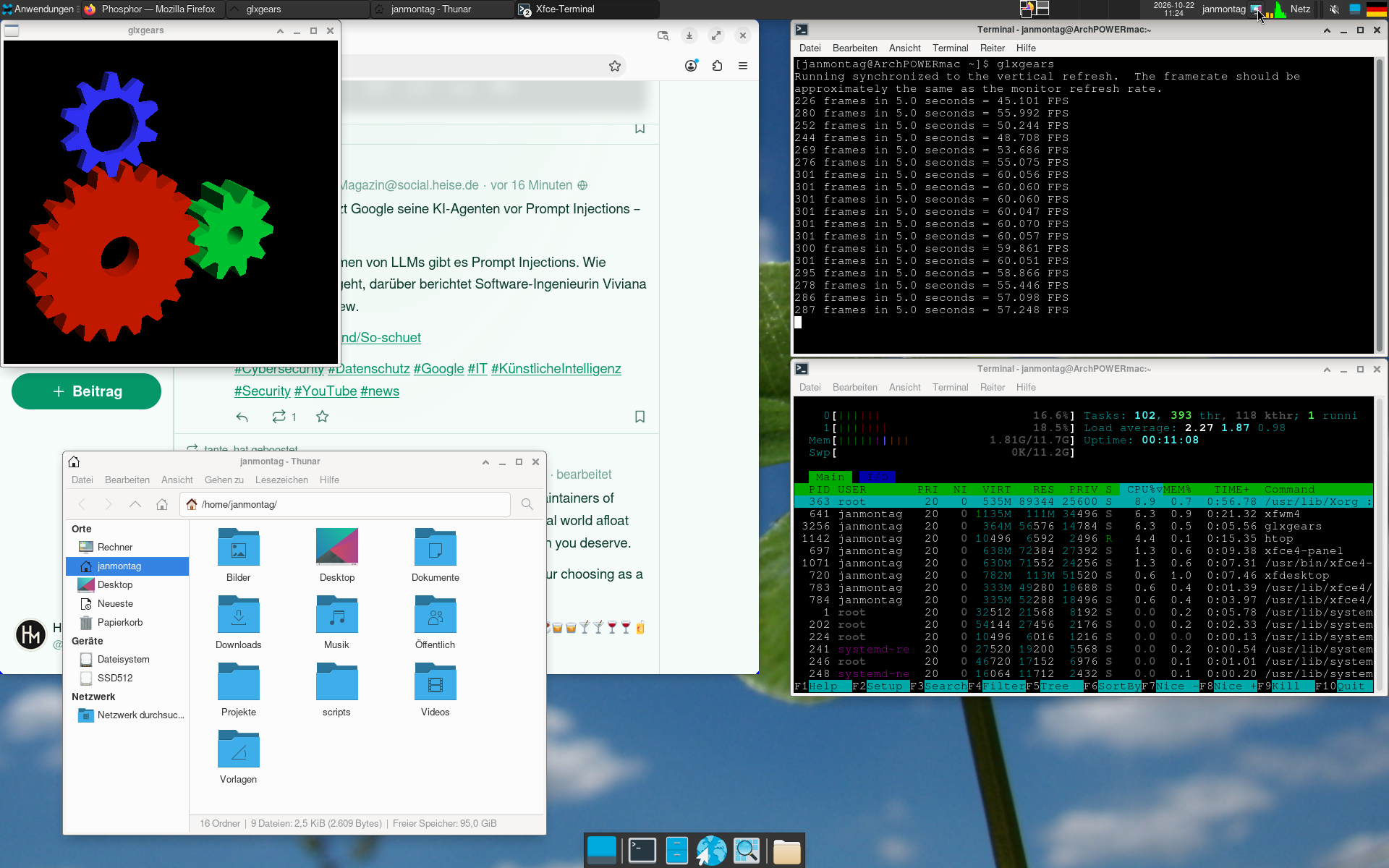
The machine
- Machine: PowerMac G5 (PowerPC 970)
- OS: ArchPOWER, Linux 7.2.11-1-ppc64
- GPU: NVIDIA NV43 [GeForce 6600 LE], 128 MB
- Xorg: xorg-server 21.1.24-1
- DDX driver: xf86-video-nouveau 1.0.18-1.1
- Mesa: 26.2.3-1
- Display: Apple Cinema Display 1920x1200 via DVI
Symptom: everything renders on the CPU
The first measurement was depressing:
$ glxinfo | grep -E "OpenGL renderer|direct rendering"
direct rendering: Yes
OpenGL renderer string: llvmpipe (LLVM 22.1.8, 128 bits)
llvmpipe is Mesa’s software rasterizer. On a 2005 dual-core G5 that is the difference between a usable desktop and a slideshow. And note the trap: direct rendering: Yes was printed even though the CPU was doing all the work. That line only tells you there is a local GL context, not that a GPU is involved. What you actually want is the Accelerated: line in glxinfo -B.
Dead end #1: tweaking the Xorg driver options
My first reflex was the usual collection of nouveau and DRI knobs:
Option "PageFlip" "false"Option "AccelMethod" "exa"Option "DRI" "2"Option "DRI3" "off"inServerFlagsMESA_LOADER_DRIVER_OVERRIDE=nouveauandLIBGL_DRIVERS_PATH=/usr/lib/driin/etc/environment
None of it helped. Some of it made things worse, because DRI3 off is exactly the opposite of what this setup needs — more on that later.
Dead end #2: blaming Mesa and downgrading it
The next suspicion was Mesa. The ArchPOWER repo only ships mesa 1:26.2.3-1, the Arch Linux Archive has no powerpc64 packages for Mesa, and neither has the ArchPOWER mirror, so a downgrade was not exactly easy.
I tried mesa-amber (the classic non-Gallium Mesa fork, 21.3.9) instead, because it still contains the old DRI drivers. That failed for a good reason:
$ pacman -Ql mesa-amber | grep dri.so
/usr/lib/dri/nouveau_vieux_dri.so
/usr/lib/dri/r200_dri.so
/usr/lib/dri/r300_dri.so
/usr/lib/dri/radeon_dri.so
/usr/lib/dri/swrast_dri.so
nouveau_vieux is the pre-2011 classic nouveau driver. It talks to the proprietary NVIDIA kernel module (/dev/nvidia0), which does not exist on a modern system — and it is not the same thing as nouveau_dri.so, the Gallium driver that xf86-video-nouveau asks for. The X server promptly logged:
AIGLX error: dlopen of /usr/lib/dri/nouveau_dri.so failed
and fell back to swrast. Downgrading Mesa was a dead end, and I reverted everything back to the stock mesa 26.2.3.
The actual finding: server fine, client broken
The important clue was in /var/log/Xorg.0.log, which looked completely healthy:
(II) NOUVEAU(0): [DRI2] Setup complete
(II) NOUVEAU(0): [DRI2]   DRI driver: nouveau
(II) AIGLX: Loaded and initialized nouveau
(II) GLX: Initialized DRI2 GL provider for screen 0
So the X server had a working hardware GLX provider. Yet clients rendered with llvmpipe. That splits the problem neatly in two: the server side is fine, the client side is what silently degrades.
Second test, to prove that the driver itself is good — EGL instead of GLX:
$ EGL_PLATFORM=x11 eglinfo | grep -E "EGL driver name|renderer"
EGL driver name: nouveau
OpenGL compatibility profile renderer: NV43
There it is: NV43, real hardware, no llvmpipe. The GPU, the kernel module and the Mesa Gallium driver were all perfectly fine. Only the GLX path was broken.
Third test, to find out why. Mesa’s client-side GLX lives in libGLX_mesa.so.0, which libglvnd loads on demand. Dump its loader symbols:
$ strings /usr/lib/libGLX_mesa.so.0 | grep loader_dri
loader_dri3_close_screen
loader_dri3_copy_sub_buffer
loader_dri3_drawable_fini
loader_dri3_get_buffers
loader_dri3_swap_buffers_msc
...
Only dri3. No DRI2 loader at all. And the failure message that goes with it:
screen %d does not appear to be DRI3 capable
That is the whole story:
- Mesa 25.1 removed the DRI2 client loader. Since then, accelerated GLX on X11 requires DRI3. There is no fallback to DRI2 any more.
xf86-video-nouveauadvertises DRI2 only by default. It does support DRI3 — the code is right there in the driver (DRI3 on EXA enabled,dri3_screen_init) — but it only switches it on when explicitly asked to.- Client asks for DRI3, server offers DRI2 → no direct rendering → llvmpipe, with
direct rendering: Yesprinted anyway.
The fix
One file, one option:
/etc/X11/xorg.conf.d/10-nouveau.conf
Section "Device"
    Identifier  "NV43-nouveau"
    Driver      "nouveau"
    Option      "DRI" "3"
EndSection
Then restart the display manager (systemctl restart lightdm) and check the log again:
(II) NOUVEAU(0): DRI3 on EXA enabled
(II) AIGLX: Loaded and initialized nouveau
(II) GLX: Initialized DRI2 GL provider for screen 0
xdpyinfo now lists all three extensions:
DRI2
DRI3
Present
And the thing we actually care about:
$ glxinfo -B
name of display: :0
direct rendering: Yes
Extended renderer info (GLX_MESA_query_renderer):
    Vendor: Mesa (0x10de)
    Device: NV43 (0x142)
    Version: 26.2.3
    Accelerated: yes
    Video memory: 115MB
    Max compat profile version: 2.1
    Max GLES[23] profile version: 2.0
...
OpenGL renderer string: NV43
OpenGL version string: 2.1 Mesa 26.2.3-arch1.1
Accelerated: yes, Device: NV43. No downgrade, no patched Mesa, no rebuilt packages.
Numbers
Measuring fill rate in a 1600x1200 window is the honest test, because that is what a full-screen desktop actually does:
- Renderer: llvmpipe → NV43
- Accelerated: no → yes
- Fill rate @ 1600x1200: ~15 Mpixel/s → ~144 Mpixel/s
- glxgears: software → 60 FPS, VSync limited
Roughly ten times the fill rate, and glxgears now sits exactly on the VSync limit instead of fighting for every frame.
Two footnotes
The CACHE_ERROR burst. At every X start, nouveau logs around 280 lines like this:
nouveau 0000:0a:00.0: fifo: CACHE_ERROR - ch 1 [Xorg[9764]] subc 7 mthd 1900 data 04e10327
They come from the EXA 3D initialisation, they appear in exactly the same number with DRI2, they do not grow while rendering, and no GPU lockup or X crash follows. Pre-existing noise, not a symptom.
The honest limitation. NV43 is a 2005 chip and its ceiling is OpenGL 2.1 / OpenGL ES 2.0. Firefox’s WebRender wants GL 3.3 or GLES 3.0, so the browser will keep compositing in software no matter what — that is physics, not configuration. The desktop, the EXA 2D acceleration and every OpenGL application up to 2.1 now run on the GPU, and that is what makes the machine feel like a computer again.
Takeaway
If a Nouveau machine with Mesa 25.1 or newer ends up on llvmpipe while the Xorg log claims a healthy AIGLX/DRI2 provider:
- ignore
direct rendering: Yesand look atAccelerated: yesplus the renderer string inglxinfo -B - run
EGL_PLATFORM=x11 eglinfoto prove that the driver itself works - run
strings /usr/lib/libGLX_mesa.so.0 | grep loader_drito see which loaders Mesa still ships - and remember that nouveau needs
Option "DRI" "3"to offer DRI3 to clients
One line in xorg.conf.d instead of an afternoon of package archaeology. And a good reminder that “it worked yesterday” usually means “I have not looked at the right log line yet”.
Thanks for reading — and if you are running an old PowerMac with nouveau, I hope this saves you the same three dead ends.
Resources
 Jan Montag
Webmentions
Reaktionen aus dem IndieWeb (Replies, Likes, Reposts).
- Lade Webmentions …
Noch keine Webmentions.