A distraction-free book editor built from ttyd, micro, and a Raspberry Pi
I write long texts in Markdown. And I constantly look for a distraction free editor and wirting expirience. For a book project, “long” stopped meaning a few screens and started meaning a file I no longer wanted to scroll through from the top every time I opened it. I also wanted the writing environment to feel like a terminal: black background, white text, 80 columns by 25 rows, no sidebars, no notifications, no editor chrome. At the same time, the file lives on an old ARM box, and I wanted to be able to write from a 27-inch screen as well as from a 13-inch laptop or with the DEC VT 520 without maintaining two different setups.
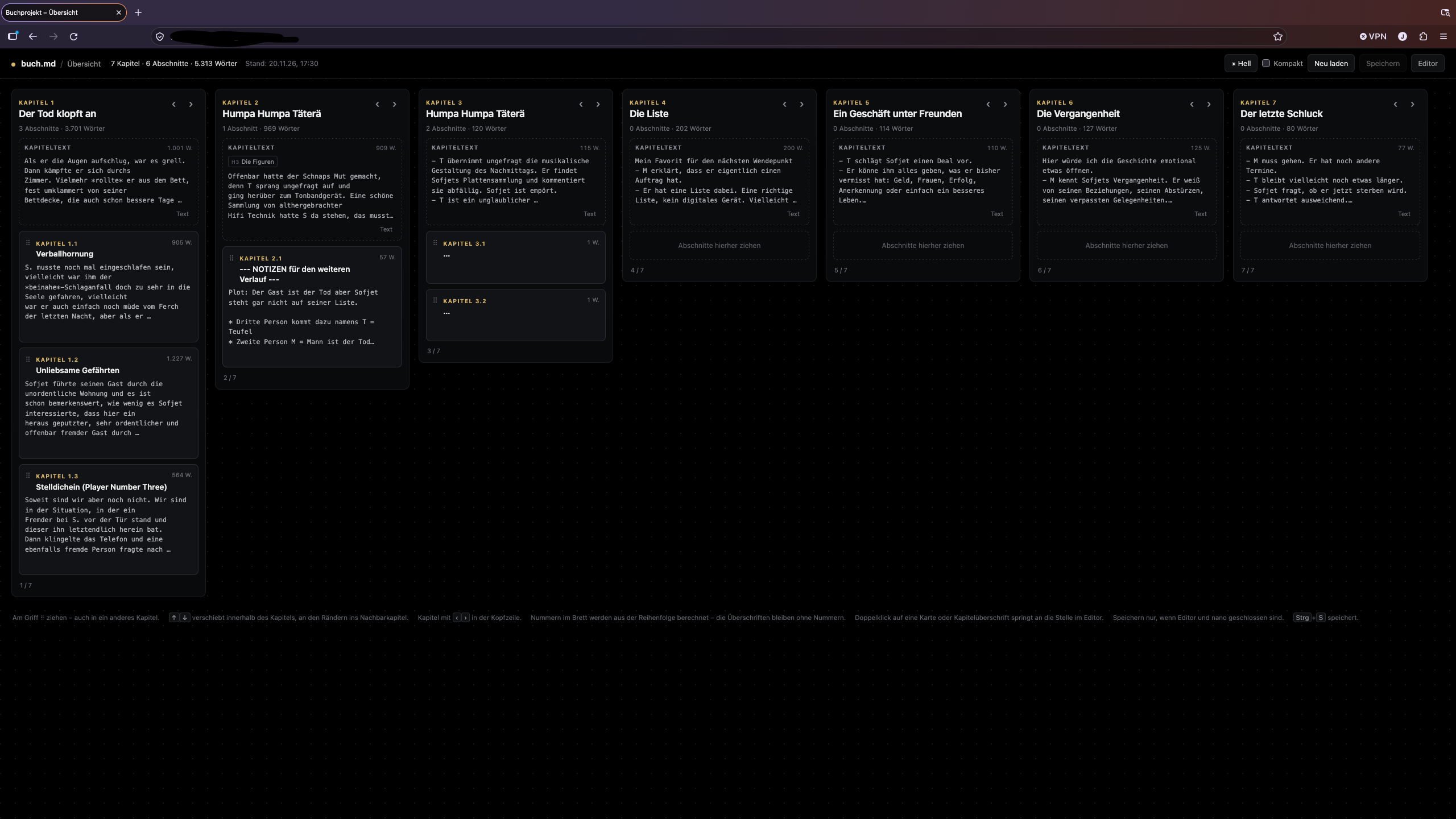
The result is a small stack: ttyd 1.7.4 serves a terminal in the browser, tmux keeps the editor session, and micro 2.0.13 edits a Markdown file that is mounted over SSHFS from the file server. A second, much smaller web service renders a board view of the manuscript: chapters as columns, sections as cards, with drag-and-drop reordering and a save button that writes the Markdown back. A Caddy 2.6.2 instance puts both behind HTTP Basic authentication.
It is not a product. It is a collection of Unix pieces that fit a very specific set of constraints. This article describes the architecture, the parts that were harder than expected, and the mistakes worth avoiding if you build something similar.
Constraints
The manuscript is a single Markdown file on a CompuLab Utilite running Ubuntu 22.04 and a 4.1 kernel. The file server is old, its root filesystem is nearly full, and it is not the machine that should run a web application. The editor, the web terminal, and the reverse proxy run on a Raspberry Pi.
The original plan was to export the directory over NFS. That failed at the kernel level: the Utilite’s 4.1.15-cm-fx6-8.0 kernel was built without CONFIG_NFSD, and there is no nfsd module to load. The workaround is SSHFS: the Pi mounts the directory as an unprivileged user, with reconnect, keepalives, and an automount unit. RequiresMountsFor= in the editor service makes systemd wait for the mount.
The second constraint is the terminal grid. The writing environment should be exactly 80×25 characters. Not “about 80 columns”, not a responsive text column: the editor should see the same terminal geometry on a 27-inch display and on a 13-inch laptop. The font size may change; the number of characters may not.
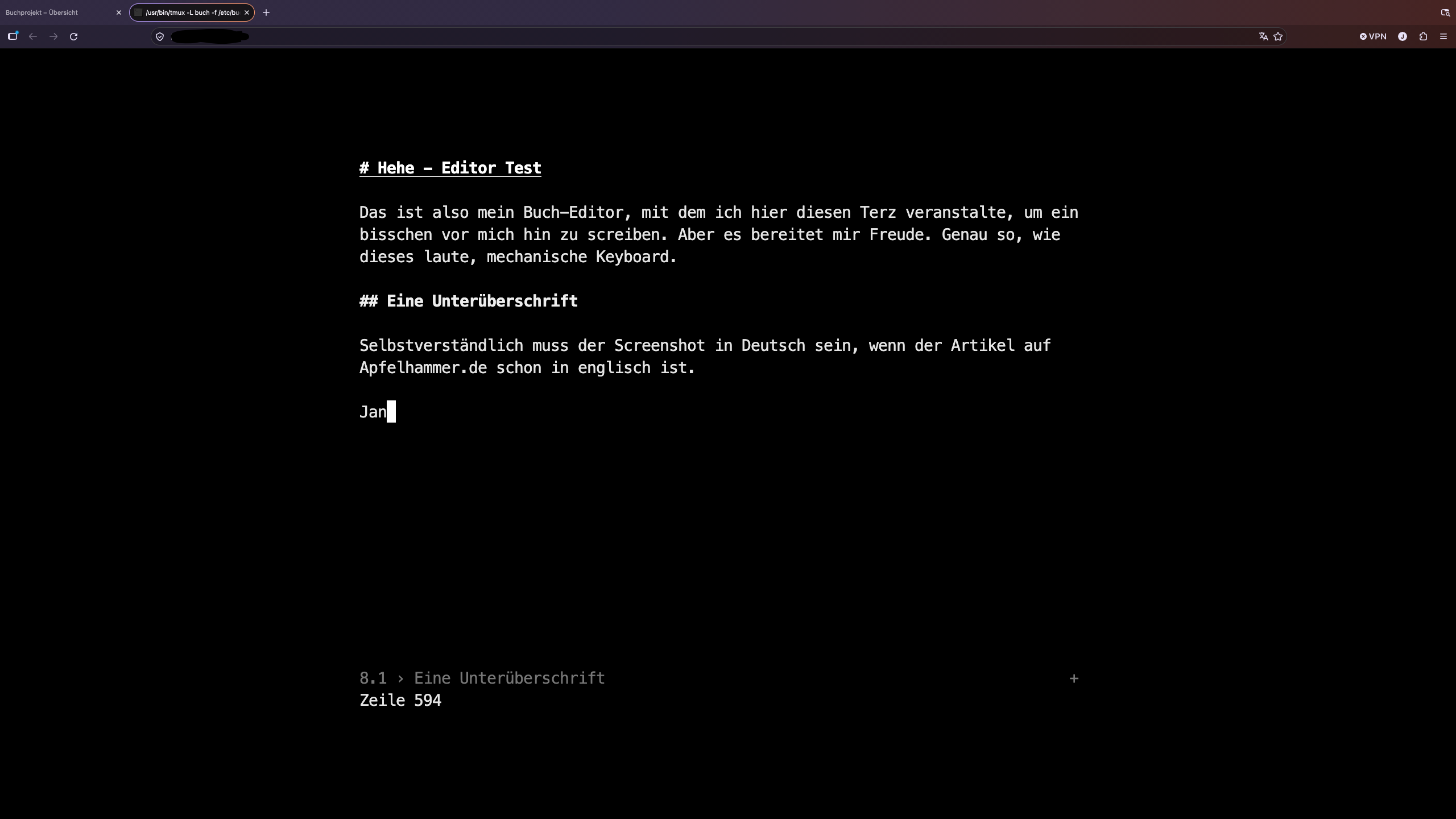
The third constraint is the file. It must remain a plain Markdown file. No database, no proprietary document format, no background sync service. If the web stack disappears, the book is still a text file on the old machineto work with the DEC on it.
The editor stack
The editor path is deliberately boring:
browser (xterm.js)
    │  WebSocket
    ▼
ttyd  ──►  tmux  ──►  micro  ──►  /mnt/book/book.md
                                  (SSHFS)
                                      │
                                      ▼
                              file server
ttyd exposes a terminal over WebSocket. tmux owns the session. micro is the editor. The file is a normal file on the Pi’s mounted directory; from micro’s point of view, there is nothing special about it.
The service runs as the same unprivileged user that owns the mount. The web terminal is bound to 127.0.0.1; Caddy is the only public entry point. The site block uses HTTP Basic authentication, HSTS, X-Robots-Tag: noindex, and Cache-Control: no-store.
One tmux option turned out to be important:
set-option -g destroy-unattached on
The editor session should not outlive the browser tab. If the last client disconnects, tmux destroys the session and micro exits. That sounds like a minor convenience; it is actually a data-safety feature. More on that below.
Forcing 80×25 without breaking the font
ttyd uses xterm.js. The browser can make the terminal as large as it wants, but the application inside must see 80×25. The custom index page measures the rendered cell size, chooses the largest font size that fits the viewport, and then sets the terminal container to exactly 80×25 cells.
The core of the fit function looks like this:
const COLS = 80, ROWS = 25, BASE = 28, MIN = 8;

function apply() {
  const term = window.term;
  const el = document.getElementById('terminal-container');
  if (!term || !el || !term.element) return false;

  const screen = el.querySelector('.xterm-screen');
  if (!screen || !screen.offsetWidth || !screen.offsetHeight) return false;

  const fs = term.options.fontSize || BASE;
  const cellW = screen.offsetWidth / term.cols;
  const cellH = screen.offsetHeight / term.rows;

  const target = Math.max(MIN, Math.min(BASE, Math.floor(Math.min(
    window.innerWidth  * 0.96 / (COLS * (cellW / fs)),
    window.innerHeight * 0.96 / (ROWS * (cellH / fs)),
    BASE
  ))));

  if (target !== fs) {
    term.options.fontSize = target;
    term.fit();
    return false;
  }

  el.style.width  = (COLS * cellW) + 'px';
  el.style.height = (ROWS * cellH) + 'px';
  term.fit();

  // Correct rounding errors until xterm reports exactly 80×25.
  for (let i = 0; i < 4; i++) {
    const dc = COLS - term.cols;
    const dr = ROWS - term.rows;
    if (!dc && !dr) break;
    el.style.width  = (parseFloat(el.style.width)  + dc * cellW) + 'px';
    el.style.height = (parseFloat(el.style.height) + dr * cellH) + 'px';
    term.fit();
  }

  return term.cols === COLS && term.rows === ROWS;
}
On a 2560×1440 display this ends up at 28 px; on a 1366×768 laptop it is 18 px. The grid stays 80×25. In steady state, tmux and micro see the same terminal they would see on a VT.
The page also recomputes on resize and on visibilitychange. The terminal is centered in the viewport, with a small margin; the scrollbars are hidden. This is the entire “responsive design”: the content does not reflow, the font does.
Markdown that still looks like Markdown
micro supports custom syntax files and colorschemes. I wanted bold and italic to be visible while editing, without turning the editor into a word processor. The syntax file defines groups for headings, strong emphasis, emphasis, inline code, quotes, lists, rules, and links. The colorschemes map those groups to styles that are readable in a terminal:
color-link default "#e8e8e8,#000000"
color-link md.h1        "bold underline #ffffff,#000000"
color-link md.h2        "bold #f2f2f2,#000000"
color-link md.strong    "bold #ffffff,#000000"
color-link md.em        "italic #d0d0d0,#000000"
color-link md.quote     "italic #909090,#000000"
color-link md.code      "#c8c8c8,#161616"
The Markdown markers remain visible. **word** is displayed with the asterisks in place; the word is bold. That is intentional: the file is the source, and the editor should not hide its structure.
The more interesting part is the status line. micro exposes a Lua API, including micro.SetStatusInfoFn, which lets a plugin provide a $(name) directive for the status line. The plugin computes the current chapter and section from the buffer:
function heading(b)
    local y = b:GetActiveCursor().Y
    local h1, h2 = 0, 0
    local h1_title, h2_title = nil, nil

    each_heading(b, y, function(_, level, title)
        if level == 1 then
            h1 = h1 + 1; h1_title = title
            h2 = 0; h2_title = nil
        elseif level == 2 and h1 > 0 then
            h2 = h2 + 1; h2_title = title
        end
    end)

    if h1 == 0 then return "" end
    if h2_title then
        return h1 .. "." .. h2 .. " › " .. h2_title
    end
    return h1 .. " › " .. (h1_title or "")
end
The status line then shows something like 1.3 › A Section Title, regardless of where the cursor is in the section. each_heading ignores headings inside fenced code blocks, which is necessary if the manuscript contains Markdown examples.
Alt-O opens a small prompt that searches the outline by text or by the computed number (1.3, 3.2, 4). It jumps with GotoLoc. The outline is not a separate file or index; it is derived from the buffer every time.
Removing the numbers from the headings
Originally the headings contained the numbers: # Chapter 1 - ..., ## Chapter 1.1 - .... That works until you move a section. A section moved from 1.4 to 1.2 still says 1.4, and now the file has two sources of truth: the order and the text.
The fix was to remove the numbers from the Markdown and compute them from the structure. The file now contains # Title and ## Title; the board displays Chapter 1.3, and the editor status line displays 1.3 › Title. The numbers are a view, not data. Moving a card updates them automatically.
This only works because the Markdown structure is strict: one # per chapter, one ## per section, and ### and deeper stay inside the surrounding block. If the structure is ambiguous, the computed numbers are ambiguous too. That is a reasonable trade-off for a single-author manuscript.
The board
Scrolling a manuscript of a few hundred lines from top to bottom is not a good way to understand a book. The board is a second view of the same file: chapters as columns, sections as cards, drag-and-drop for reordering.
The server is a single Python 3.12 file using only the standard library. It is bound to 127.0.0.1 and sits behind the same Caddy site and the same Basic authentication.
The parser is the part that must be correct. It splits the file into a preamble, H1 chapters, and H2 sections, ignoring headings inside fenced code blocks. It keeps the raw lines of every block, so the file can be reconstructed byte-for-byte. It is not a Markdown renderer; it is a structural parser with a round-trip guarantee.
A small API drives the page:
GET /api/bookreturns the parsed structure, word counts, 1-based line numbers, the current SHA-256 of the file, the shared theme, and whether the editor is running.POST /api/saveaccepts an ordered list of chapter IDs and section IDs, validates the version, reconstructs the Markdown, verifies that the multiset of lines is unchanged, writes a backup, and replaces the file atomically.POST /api/gotowrites a jump request and signals the running editor.POST /api/themewrites the shared theme and signals the editor.GET /api/statusis the polling endpoint for external changes and the editor state.
The save path is intentionally conservative:
raw = self.read_bytes()
if version != sha256(raw):
    return 412, {"error": "File changed outside this page", "code": "stale"}

if editor_running(self.uid, self.editor_check):
    return 409, {"error": "Editor is open", "code": "editor-open"}

# parse, validate that every chapter/section ID appears exactly once,
# reconstruct the text, and compare the line multiset with the original.
The line-multiset check is a cheap invariant: reordering sections must not add, remove, or duplicate a single line. If the parser has a bug, the save is refused instead of writing a broken manuscript. The write itself is a temporary file in the same directory, fsync, os.replace, and a backup of the previous file under /var/lib/buch-board/backups. The backup directory lives on the Pi, not on the file server whose root filesystem is almost full.
The front end is plain HTML, CSS, and JavaScript. No framework. Cards can be dragged within a chapter or into another chapter; chapters can be moved with arrow buttons. Each card has up/down buttons as a keyboard- and touch-friendly fallback. A compact mode hides the previews. A click on a card expands the full text; a double-click jumps to it in the editor.
The page never writes automatically. If the editor is open, saving is disabled. If the file changed externally while the board is clean, the board reloads it; if the board has unsaved changes, saving is locked and the user is asked to reload. The browser also warns before closing a tab with unsaved board changes.
Two layers of theme
A terminal in a browser has two independent color systems:
- The terminal emulator (xterm.js) controls the background, foreground, cursor, selection, and the ANSI palette.
microcontrols the colors of syntax groups and the status line.
Changing only one of them produces a broken result: a light terminal background with micro’s black default style still looks dark. Both layers have to change together.
The shared state is a two-word file, /var/lib/buch-board/theme, containing dark or light. The board’s “Light” button writes it and, if the editor is running, sends a key to the tmux pane. A small Lua command in micro reads the file and calls:
config.SetGlobalOption("colorscheme", theme == "light" and "buch-light" or "buch")
SetGlobalOption is the same code path as the set colorscheme command: it reloads the colorscheme and updates all open buffers. The terminal page polls the board’s /api/theme endpoint and applies the matching xterm.js theme object. The editor’s Alt-T toggles the shared file; the board picks it up on its next poll.
The light scheme is not pure white. It uses a warm paper tone (#f6f3ec) and near-black ink (#24211c). On a bright display, pure white is more tiring than paper. The dark scheme remains black with light grey text. The same file drives both the browser terminal and the editor; a laptop and a desktop converge on the same theme.
There was one non-obvious failure here. The board service initially ran with PrivateTmp=true. That gave the Python process a private /tmp, so it could write the theme file but could not see the tmux socket in /tmp/tmux-<uid>/. The file changed, the board looked correct, and the running editor ignored it. Removing PrivateTmp fixed the live sync. Sandboxing is useful, but it can also cut the IPC you forgot you depended on.
Jumping from the board to the editor
The board is useful for structure, but the actual writing happens in micro. Double-clicking a card should put the cursor on that section.
The board cannot call into micro directly. The bridge is deliberately small:
- The board writes a request file containing the line, a timestamp, a token, the heading title, and the heading level.
- If
microis running, the board sendsAlt-Uto the tmux pane withtmux send-keys. - The Lua plugin reads the request file, deletes it, searches the buffer for a heading with the same title and level, and jumps with
GotoLoc. - If no title match exists, it falls back to the line number.
- If the editor is not running, the board opens a new editor tab; the plugin consumes the request on
onBufPaneOpenat startup.
The title is not redundant. The board reads the file on disk; the editor may contain unsaved changes that shifted every line number. A line-based jump would land a few lines off, or in the previous section. Searching for the heading text and level survives that. If the heading itself was edited in the unsaved buffer, the fallback is the line number.
The jump request has a timestamp and is removed by a timer if it is not consumed. The endpoint is behind the same Basic authentication and requires a custom header, so a random cross-site form post cannot write it. The board also sends the file’s SHA-256; if the file changed since the board loaded it, the jump is refused with “reload first” instead of landing in the wrong place.
Alt-U and Alt-Y are internal signals; Alt-T is the user-facing theme toggle. They are registered with config.TryBindKey and do not conflict with micro’s default Alt bindings.
The part that matters: not losing text
The first version of the editor enabled autosave with a ten-second interval, because autosave sounds safe. It is not. micro’s autosave writes the buffer every ten seconds, whether or not it changed, without prompting. With a second editor (a VT520 running nano on the same file) this is a data-loss machine: the web editor periodically overwrites changes it has never seen.
The current configuration sets autosave: 0. Saving is an explicit action. The web editor session ends when the browser disconnects (destroy-unattached), so there is no stale micro process holding an old buffer while another machine edits the file. The board refuses to save while micro is running. The board checks the file’s SHA-256 before writing. Every save creates a backup and writes atomically.
micro 2.0.13 detects external changes when it receives the next keypress and offers to reload. It does not check at save time. That is another reason not to run two editors on the same file: the tooling can reduce the risk, but it cannot make nano and micro safe neighbours. One writer at a time is still the rule. The difference is that the system now enforces most of it instead of relying on memory.
The destroy-unattached option has a second effect: closing the browser tab ends the editor session. That is good for safety, but it means a browser crash can leave a micro backup behind. On the next start, micro asks whether to recover it. The backup is a feature, not a bug; it is the reason the text survived my own testing mistakes.
Testing
Most of the testing was done without touching the real manuscript.
The parser has a round-trip test: parse the file, serialize it, compare the bytes. Any parser change that loses a blank line or a heading is caught immediately. The save path has a second invariant: the multiset of lines in the reconstructed file must equal the original. A section moved across chapters changes order, not content.
The browser UI was tested with headless Chromium. The responsiveness is checked by taking screenshots at 2560×1440 and 1366×768 and reading the terminal title, which reports the grid and font size. The drag-and-drop path was exercised with synthetic DragEvent objects and a DataTransfer, because a headless browser does not have a mouse. Saving, the editor lock, the external-change reload, and the theme toggle were tested the same way.
The terminal side was verified by capturing the tmux pane with SGR escape sequences. That is how you check that bold is actually SGR 1, italic is SGR 3, and the light theme really has a light background instead of a black screen with light text. The jump was tested with the editor running, with the editor closed, and with five unsaved blank lines inserted at the top of the buffer to shift every line number.
A no-op save against the real file returns changed: false and writes nothing. The real file’s checksum was compared before and after the tests; it did not change.
Trade-offs
A terminal editor in a browser is not a native web editor. There is no proportional typography, no inline images, no rendered preview, no collaborative cursor. The Markdown markers stay visible. That is the point: the text stays a text file, and the same editor can run in a terminal.
The board is a separate page, not a mode inside the editor. It is a structural view, not a WYSIWYG view. It works well for a book with a strict #/## hierarchy; it would be less useful for a document with deeply nested sections and no clear chapter level.
The theme and jump features depend on the board service and on tmux. If the board service is down, micro can still read the theme file at startup, but the browser terminal cannot fetch the theme, and the jump signal has no sender. These are acceptable failure modes for a personal tool, but they are dependencies worth knowing about.
Basic authentication is not a user system. It is a lock on a private writing tool, not an account model. The editor and the board are bound to localhost and proxied by Caddy; the host is not a public service.
Finally, the 80×25 constraint is deliberate, but it is still a constraint. On a 13-inch laptop the font is small. The board is the place to get an overview; the editor is the place to write one section at a time.
Why this shape
The alternative would have been a conventional web editor: a JavaScript framework, a contenteditable surface or CodeMirror, a backend with a database, a sync layer. That is a reasonable product. It is not what this project needed.
What it needed was a terminal that happens to be reachable from a browser, a file that stays a file, and a second view that makes the structure visible. ttyd, tmux, micro, SSHFS, Caddy, and a few hundred lines of Python and Lua are enough for that. The old file server keeps the manuscript; the Pi does the web work; the browser is a terminal; the VT can still edit the same kind of file.
The novel is still the hard part. The tooling just gets out of the way. That said and all for the sake of a dstraction free writing experience.
 Jan Montag
Webmentions
Reaktionen aus dem IndieWeb (Replies, Likes, Reposts).
- Lade Webmentions …
Noch keine Webmentions.